
One record per project
Every call files itself under its project, with one page of where things stand and who owes what.
- Decisions and open questions
- Who owes what
- Tasks with owners


Kept checks each call against what was already agreed, flags the contradiction before you hang up, and follows through. On your device, and only with your OK.
Calls from the Acme project going into Kept:
What Kept catches and follows through on:
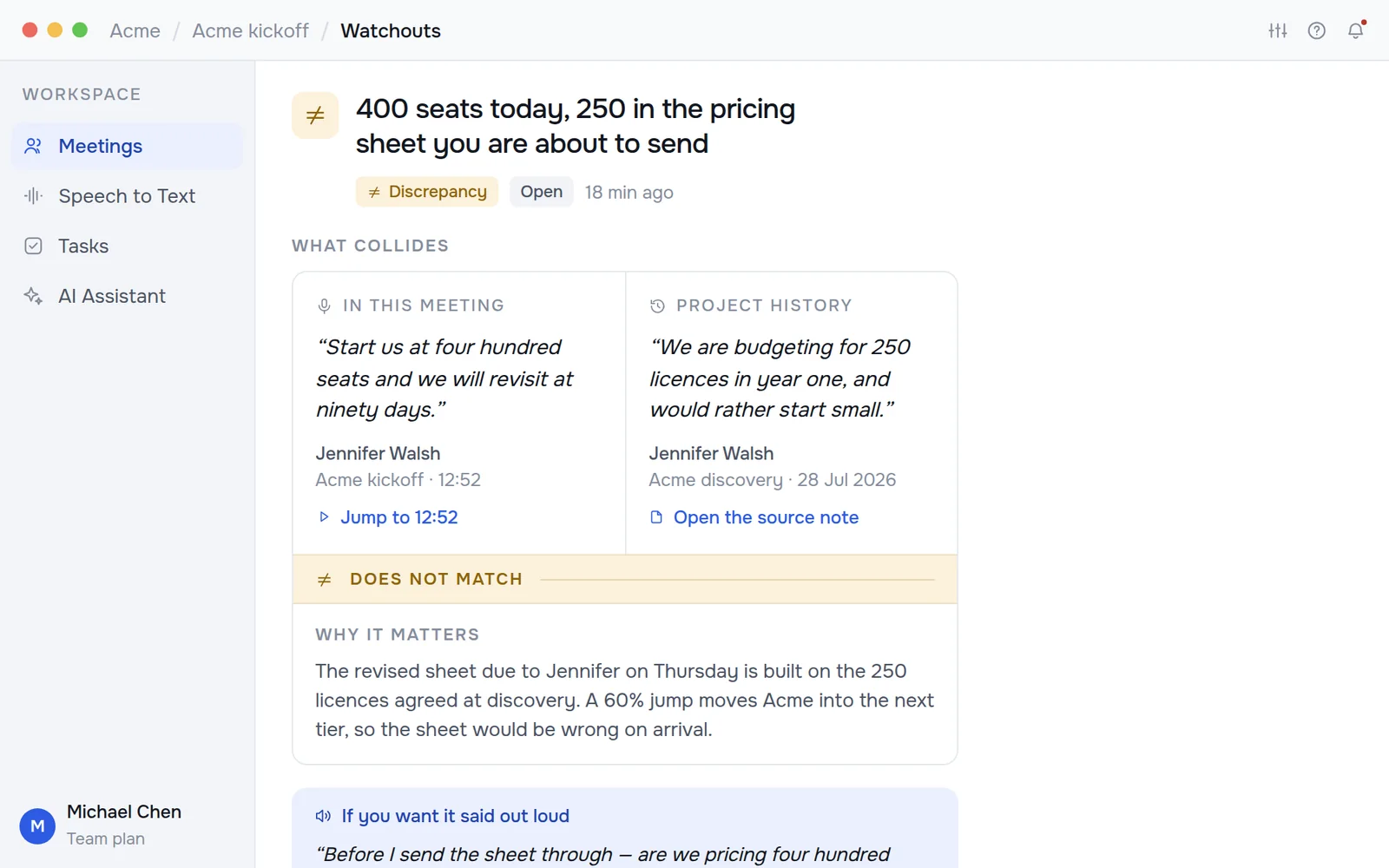
Kept reads every call against what the project already agreed: earlier calls, the pricing sheet, the scope. When something doesn’t match, you see both lines side by side, while you can still fix it on the call.
Something agreed today contradicts something agreed before.
A seat count, rate or date that doesn’t match the sheet.
Asked on a call, never answered. Kept remembers so you don’t have to.
Every call files itself under its project, with one page of where things stand and who owes what.
Ask what you promised and get the call and the minute. Ask Kept to act and it drafts the email, invite or ticket for you to approve.


Hold Fn and talk. Your words land at the cursor in any app, transcribed on your device.

Most tools stop at the notes. Kept carries each promise from the call to done, then checks the next call to make sure it stayed done.
Both sides of the call, captured on your device and transcribed in 30+ languages.
Decisions, commitments and owners pulled out, each linked to the second it was said.
Follow-ups drafted in Gmail, Jira, Slack and more, waiting for your OK.
The next call is read against it. If anything drifted, a watchout says so.
Seats, rates and dates on the call are checked against your documents.
Kept records both sides from your computer, and one click sends the recap to everyone on the call.Works with Zoom, Google Meet, Microsoft Teams, Webex and Slack huddles.
Set each call’s spoken language for the sharpest transcript.
Pick the parts, send a link, set when it expires.
Recordings stay local and are never used for training. Cloud transcription is opt-in.
Voice mode uses your Anthropic key; text chat needs none.
Meeting hours and words dictated, counted on your device.
Kept reads the places a project lives, checks every call against them, and files follow-ups back where your team works, once you approve.
Dictation is free and unlimited on every plan.
For getting started.
Includes:
For anyone whose work is agreed on calls.
Includes:
For teams sharing projects.
Includes:
Every plan runs on all five platforms and keeps your recordings on your own device.
A notetaker hands you one call. Kept checks each call against everything the project already agreed, flags what doesn’t match, and follows through with drafts for your OK.
No. Kept records both sides from your computer. We recommend telling everyone on the call that it’s on, and one click sends them the recap afterwards.
On your device only. Nothing is uploaded unless you turn on cloud transcription.
Never. Your recordings are not used to train models, ours or anyone else’s. That is a contractual term, not a setting.
Zoom, Google Meet, Microsoft Teams, Webex and Slack huddles. Kept offers to start when one begins.
No. It runs on your device by default; cloud transcription is optional.
Only for voice conversation mode, which uses your own Anthropic key. Text chat works without one.
Unlimited local dictation, 10 recorded meetings a month and 1 seat.
Free plan · Windows, macOS, Linux, iOS and Android